Making it SIMPLE for YOU to become a great digital scrapbooker

Digital Scrapbooking Supplies, Educational Movie Tutorials and eBooks, Commercially Licensed Graphic Design Products

72-dpi? 200-dpi? 300-dpi? What is resolution size all about and why is it important?

How does DPI affect the quality of my results?

Warning: If this page loads slowly it is because it is demonstrating quality elements that require larger files than are normally available on the Internet.

Question: What are JPG (.jpg) or PNG (.png) file? What does that mean?

Answer: These are the graphic file types that belong to a graphic family called Bitmaps. Bitmaps have tiny dots called pixels. Color information is held in each of these pixels and then this information is passed to the computer - or printer - that has to do something with this map so that the image can be reproduced.

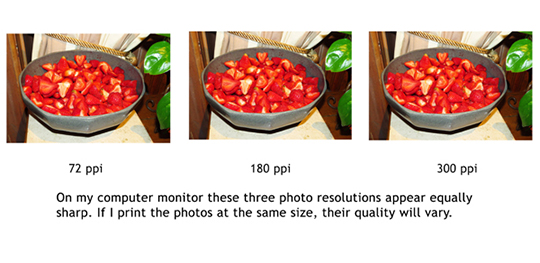
When you reduce the size of the dots (pixels) so that more of them are required, you get better images. 72-dpi (dots per inch) means that there aren't very many dots in the image and that they are bigger (so the image looks grainier) and 300-dpi means that there are many, smaller dots (so the image looks sharper).

A JPG is the most commonly used file type and is commonly used for printing and the web. A PNG is a transparent file type. This means that you don't see any background color around the image because it's clear. This quality makes it wonderful for digital scrapbookers. To see PNGs in action, watch our FREE Basics of Digital Scrapbooking movie tutorials! However, PNGs don't print out well, as they confuse many printers. This is why Scrap Girls gives our customers both file types when they purchase alphabets, transparencies and embellishments. We want to make sure that paper scrapbookers AND digital scrapbookers can use our files.

To learn more, view the article on printable versus digital files.

Question: How do these numbers affect results and file sizes?

Answer: Because 72-dpi graphics have fewer dots, they have less information that must be passed from computer to computer. The resulting file sizes are small. That's why 72-dpi has become the "de-facto" standard for sharing graphics over the Internet or through email.

300-dpi is considered to be an industry standard for book, magazine and professional printers because the dot size is small enough that the prints are sharp and clear. Because there is much more information stored with a 300-dpi file to ensure better results, the file size must be larger. This means that if you are downloading files that are 300-dpi from the Internet, you can expect that they may take a while to receive - particularly if you have a dial-up connection. But the wait is worth it in the long run because you'll have fabulous results when you print out the files! This is why Scrap Girls gives our customers 300-dpi files.

Question: But I'm not a professional printer. I use my printer at home. Why should this matter to me?

Answer: Today's new-generation, photo-quality printers are being made specifically so that they can reproduce photo print results that are equal to or superior to photo lab results.

For instance, in discussing one of their printers Canon states:

With the CP-300, you can produce prints that match the appearance and long-life of images produced by traditional film processes. Engineered for superior picture quality, these printers have a resolution of 300-dpi and 256 levels of color so you can create richly detailed prints from 2.0 Megapixel or greater cameras.

More and more scrapbookers are using high-quality digital cameras and will soon discover that it has become entirely feasible to not only save money printing out their own photographs, but also that the quality of the prints are superior than they have ever seen before on a home printer.

So the short answer that comes after a very long explanation is this - why wouldn't you want to have all of your scrapbooking print-outs be at the same quality as your photographs? If you use 300-dpi files whenever you scrapbook, you will get these high-quality results every time.

Question: Can't I just change the dpi setting and get the same results?

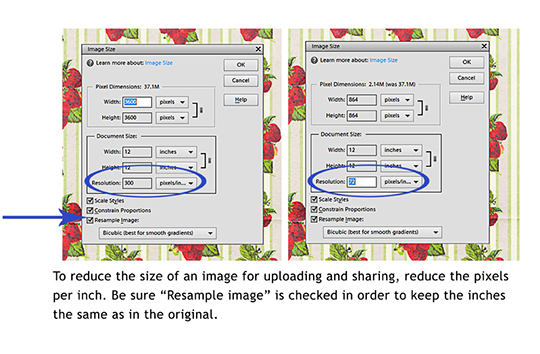
Answer: You may change the dpi setting at will, but if the original dpi information was 72-dpi or 200-dpi, raising the number to 300-dpi just splits the existing dots into smaller pieces and if the computer doesn't know what to do, it guesses. You will not get the increased color variations that can be found when a file was originally created at 300-dpi.

Remember, dpi is a means for computers to communicate file information with each other and so dpi is is really a mathematical formula. Your computer can't invent information that wasn't there originally, so it will try to guess what it should do and the results you will see will usually be disappointing. Typical outcomes include blurry contours and "pixilated" images. (Pixilated means visually seeing tiny squares on your image.)

Question: Is there anything special I should know about saving my graphic files?

Answer: Yes! Resaving JPGs over and over again will cause the quality to degredate. This is why it is important to retain your original file when you scrapbook digitally, which is usually some other type of file (such as PSD if you are using Photoshop, for instance). This type of file saves all of the original information, and not only allows you to edit your layout at will, but the quality won't lesson over multiple savings. Then, you can do "Save As" actions to generate JPGs as often as needed from this original file and the quality will be retained.

These types of (original) files are layered, however, and are very large. You will want to get into a routine of saving them every so often onto storage media, such as CDs or DVDs, so that your hard drive doesn't get cluttered up. When your hard drive gets too full, your computer's performance will get terrible. Avoid this by storing them elsewhere. (Make sure that you are using quality CDs!)

Scrap Girls University - Digital Scrapbooking Tutorial - What is resolution size all about and why is it important?
Original resolution: 180-dpi (145 pixels wide)

Scrap Girls University - Digital Scrapbooking Tutorial - What is resolution size all about and why is it important?
Results when photo size is increased to 300 pixels wide.

The resulting file is grainier than the original because the computer is just increasing the size of the dots. Notice the blurring.

Scrap Girls University - Digital Scrapbooking Tutorial - What is resolution size all about and why is it important?

Photo that was scanned into the computer at a resolution of 300-dpi (300 pixels wide). This photo is much sharper because the computer originally received color information about 300 dots. If the width and height of this image is lowered, the quality will still remain nice. However, if the picture is blown up in size too much, the dots will get larger and the photo will become grainy. This is a natural consequence of blowing up Bitmap images.

Tutorial by Rozanne Paxman, Scrap Girls CEO


University Topics
Select a Category:

University Home

The Basics

Digital Scrapbooking Tips and Tricks

Digital Photos

Designer-Made Items

Photoshop

Photoshop Elements

Paint Shop Pro

Digital Image Pro

Other Software

ScrapSimple Digital Layout Templates

ScrapSimple Paper Digital Templates

ScrapSimple Embellishment Digital Templates

ScrapSimple Alpha Digital Templates

ScrapSimple Card & Craft Templates

ScrapSimple Digital Tools

Digital Brushes

Digital Textures

Fonts

Printables

General Scrapbooking

General Digital Scrapbooking Help

Site Information and Tutorials

Themed Thoughts

Support Center

Contact Scrap Girls

Privacy Policy

Terms and Conditions


Scrap Girls free newsletter

Join our newsletter list and get scrapbooking freebies with each issue!


Scrap Girls Boutique
Select a Category:

What's New?

Commercial What's New?

Clubs

Commercial Club

Assemble Your Own, Easy Pages, Transparencies, Word Art

Brushes/Textures

Cards and Crafts

Collections, Papers, Embellishments, Alphas

ScrapSimple Templates

Tools, Shapes & Actions

Shop by Theme

Value Packs and Kits

SB Secrets Revealed Programs & eBooklets

eBooks

Online Training Classes

Fonts

Commercial

Your Order on a CD

Scrap Girls T-Shirts and More

Freebies

Want Scrapbooking Freebies? Join our newsletter list!

Scrap Girls Guarantee

Digital scrapbooking is...

  • Fast.
  • Creative.
  • Fun.
  • And it saves you money.*

Let Scrap Girls show you how surprisingly simple it can be to become a great digital scrapbooker.

Better Business Bureau Reliability Program

* Digital supplies are less expensive to purchase and can be used over and over and over again...

NEW! Discover your hidden scrapbooking talent today! MORE Scrapbook Software Secrets Revealed for Photoshop will have you doing the same tricks and knowing the same tips as the professionals! With MORE Scrapbook Software Secrets Revealed for Photoshop, you will be creating your own digital elements and enjoying advanced techniques on your digital scrapbooking layouts in no time!

More Scrapbook Software Secrets Revealed for Photoshop Elements movie tutorials

Have a blast doing the more advanced tricks that you see other people and professional digital scrapbookers doing. Learn how with MORE Scrapbook Software Secrets Revealed for Photoshop Elements.

Scrapbook Software Secrets Revealed for Photoshop Elements (PSE)

Learn how easy it is to create digital scrapbooking layouts in PSE 6.0 with these easy-to-understand tutorial movies in Scrapbook Software Secrets Revealed for Photoshop Elements 6.0 and 7.0.

PSE 5.0 version available here.

PSE 4.0 version available here.

PSE 3.0 (works for 2.0) version available here.

Scrapbook Software Secrets Revealed for Photoshop (PS)

Find out how easy it is to use Photoshop to create digital scrapbooking layouts and edit your photos! Scrapbook Software Secrets Revealed for Photoshop. (Versions 6, 7, CS, CS2 and CS3).

Scrapbook Software Secrets Revealed for Paint Shop Pro (PSP) X

Learn how easy it is to create digital scrapbooking layouts with these easy-to-understand tutorial movies for Paint Shop Pro X. (Can be used for PSP XI, too!)

PSP 9 version here.

Digital Photoshop Simplified tutorial eBook

This great eBook will take digital scrapbookers photos to a new layer. Diane Miller's photographs are amazing and her Photography Simplified eBook shows you how you can get fabulous shots, too!

Beginners Guide to Filters and Plug-ins for Photoshop, Photoshop Elements

If you're at all curious about using filters and plug-ins in digital scrapbooking , then The Beginners Guide to Filters and Plug-ins for Photoshop and Photoshop Elements (Windows) is what you need!

Paint Shop Pro version available here.

Mastering Brushes eBook

This ebook was created from the popular online class Creative Brushwork. It is perfect for the scrapbooker who want to go above and beyond basic brushing techniques taught in Scrapbook Software Secrets Revealed for Photoshop Elements. Make your layouts shine with the polish that advanced brushwork can bring!

Photoshop version available here.

Ten Beginner Tips on Type eBook

If you want to take some beginner steps towards improving the type on your layouts, and thereby improving the overall look of your layouts, then this eBook is perfect for you. It's written in a very simple style, focusing on one digitally scrapbooked layout while walking you through ten tips that take type from mundane and awkward to eye-catching and cohesive.

Start to Finish eBooklet - PSE: How to Make a Birthday Scrapbook Page

Nothing could be simpler than learning to scrapbook digitally with Scrap Girls Start to Finish eBooklets. Step by step written guidelines and detailed screenshots will help you learn new digital scrapbooking skills. Included with the eBooklet are the actual digital files you need to create a finished project!

Start to Finish eBooklet - PS: How to Combine ScrapSimple Paper & Photo Templates also available!

Start to Finish eBooklet - PS: How to use ScrapSimple Tools: Custom Shapes & Patterns also available!

Start to Finish eBooklet - PS: The Beauty of Blending Modes: Using them with ScrapSimple Products also available!

Start to Finish eBooklet - PSE: How to Emboss & Texturize with ScrapSimple Templates also available!

Start to Finish eBooklet - PSE: Making a Just Because Card Using ScrapSimple Card Templates also available!

Start to Finish eBooklet - PSE: How to Combine ScrapSimple Paper & Photo Templates also available!

Start to Finish eBooklet - PSE: The Beauty of Blending Modes: Using them with ScrapSimple Products also available!


Affiliates | Contact | Privacy Policy
Terms and Conditions

© Copyright 2004-2009 Scrap Girls, LLC
All Rights Reserved.


Scrapbookingtop50 Counter               Best Scrapbooking Sites, Digital Scrapbooking, Scrapbook Supplies, Reviews, Awards

      Check out the Top 50 Scrapbooking sites!    Digital Scrapbooking Top50     Hybrid Top 50